How Electromagnetic Signature Pads Support Paperless Signing: Electronic Signatures, Identity Verification, and Data Retention
Counter services, government windows, hospital workstations, and parcel delivery have long relied on paper forms and handwritten signatures. This approach carries high printing and archiving costs, and documents are easily lost in transit or storage. A signature pad converts the original handwritten signature into electronic data, and combined with identity verification and encrypted storage it enables paperless processing while keeping the signing habit intact.
1. Two technical approaches: electromagnetic and capacitive
Signature pads are commonly built on one of two approaches. An electromagnetic design uses electromagnetic coupling between the pen and the sensing board to locate the pen tip and read pressure data, which produces a writing feel close to pen on paper. A capacitive design uses capacitance changes caused by a finger or stylus on the screen, and its advantage is that it can share the same screen with the display, resulting in a more compact structure.
The two approaches correspond to different product designs. A display signature pad can show business information and the signing area on the same screen, which suits scenarios where the customer must confirm terms, amounts, or receipt content. A non-display pad is usually thinner and lower in cost, and suits steps where only signature data is captured.
2. What 4096 pressure levels mean
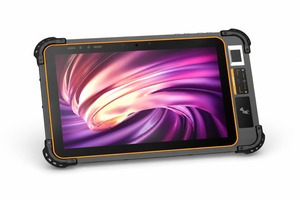
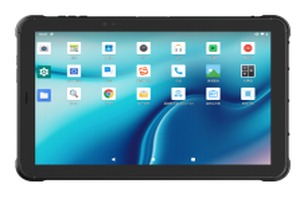
Pressure level refers to the number of pen pressure gradations a device can distinguish. A 10.1-inch display electromagnetic signature pad supports 4096 pressure levels, which means the force at the start of a stroke, the speed of the stroke, and the lift at the end are all recorded.
This matters in practice. The characteristics of a signature lie not only in the shape of the strokes but also in the distribution of writing force. A higher pressure level preserves more of that detail, making the electronic signature closer to the paper version and providing better reference data if handwriting examination is ever required. For businesses that must retain signing evidence over the long term, these details form part of the credibility of the record.
3. Integrating identity verification with signature capture
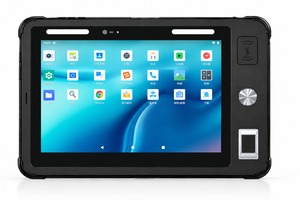
A signature alone does not complete a business workflow, because the system cannot confirm who signed. A signature pad can integrate an ID card reader, a fingerprint scanner, and a camera, merging identity verification and signature capture into a single operation.
In a bank counter scenario, the teller first reads the customer document through the ID card reader, the customer reviews the business information on the pad and signs, and the system records the signature, timestamp, and device identifier. No paper form is printed and no information is entered twice.
4. Typical deployment scenarios
Banking and insurance. Account opening, card loss reporting, claims, and credit interviews require customers to sign multiple documents. A signature pad replaces paper forms, reduces printing and scanning steps, and the records can be archived by business serial number.
Government service halls. For business registration, tax handling, and social insurance, the pad can be connected to the queue system and business system so that confirmation and signing are completed at a single window.
Healthcare. Informed consent forms, surgical consent forms, and electronic prescriptions require a patient or family member signature. The pad can be embedded in the workstation, and the signed document enters the electronic medical record system immediately.
Logistics receipt. Couriers confirm delivery on a handheld terminal or tablet, and the signature data is uploaded together with the waybill number, avoiding delayed collection of paper receipts.
5. Compliance considerations
Electronic signatures are subject to legal requirements. Article 13 of the Electronic Signature Law of the People's Republic of China states that a reliable electronic signature must satisfy several conditions at the same time: the signature creation data is used exclusively by the signatory when signing; the signature creation data is controlled only by the signatory at the time of signing; any subsequent modification of the electronic signature can be detected; and any subsequent modification of the content and form of the data message can be detected.
At the device level this implies several capabilities. First, signature data must be bound to the signer identity, usually through document reading, fingerprint matching, or facial recognition. Second, signature data must be encrypted in transit and at rest to prevent tampering. Third, the signing process must be traceable, including timestamps, device information, and operation logs. Fourth, the device should support original handwriting playback and signature verification for later review.
6. Summary
The value of a signature pad is not simply moving a signature from paper to screen, but turning the act of signing into electronic data that can be verified, traced, and stored in encrypted form. When selecting a model, first determine whether the business requires on-screen confirmation and whether an identity verification module is mandatory, then choose the device form and deployment method according to signing volume.
1. Two technical approaches: electromagnetic and capacitive
Signature pads are commonly built on one of two approaches. An electromagnetic design uses electromagnetic coupling between the pen and the sensing board to locate the pen tip and read pressure data, which produces a writing feel close to pen on paper. A capacitive design uses capacitance changes caused by a finger or stylus on the screen, and its advantage is that it can share the same screen with the display, resulting in a more compact structure.
The two approaches correspond to different product designs. A display signature pad can show business information and the signing area on the same screen, which suits scenarios where the customer must confirm terms, amounts, or receipt content. A non-display pad is usually thinner and lower in cost, and suits steps where only signature data is captured.
2. What 4096 pressure levels mean
Pressure level refers to the number of pen pressure gradations a device can distinguish. A 10.1-inch display electromagnetic signature pad supports 4096 pressure levels, which means the force at the start of a stroke, the speed of the stroke, and the lift at the end are all recorded.
This matters in practice. The characteristics of a signature lie not only in the shape of the strokes but also in the distribution of writing force. A higher pressure level preserves more of that detail, making the electronic signature closer to the paper version and providing better reference data if handwriting examination is ever required. For businesses that must retain signing evidence over the long term, these details form part of the credibility of the record.
3. Integrating identity verification with signature capture
A signature alone does not complete a business workflow, because the system cannot confirm who signed. A signature pad can integrate an ID card reader, a fingerprint scanner, and a camera, merging identity verification and signature capture into a single operation.
In a bank counter scenario, the teller first reads the customer document through the ID card reader, the customer reviews the business information on the pad and signs, and the system records the signature, timestamp, and device identifier. No paper form is printed and no information is entered twice.
4. Typical deployment scenarios
Banking and insurance. Account opening, card loss reporting, claims, and credit interviews require customers to sign multiple documents. A signature pad replaces paper forms, reduces printing and scanning steps, and the records can be archived by business serial number.
Government service halls. For business registration, tax handling, and social insurance, the pad can be connected to the queue system and business system so that confirmation and signing are completed at a single window.
Healthcare. Informed consent forms, surgical consent forms, and electronic prescriptions require a patient or family member signature. The pad can be embedded in the workstation, and the signed document enters the electronic medical record system immediately.
Logistics receipt. Couriers confirm delivery on a handheld terminal or tablet, and the signature data is uploaded together with the waybill number, avoiding delayed collection of paper receipts.
5. Compliance considerations
Electronic signatures are subject to legal requirements. Article 13 of the Electronic Signature Law of the People's Republic of China states that a reliable electronic signature must satisfy several conditions at the same time: the signature creation data is used exclusively by the signatory when signing; the signature creation data is controlled only by the signatory at the time of signing; any subsequent modification of the electronic signature can be detected; and any subsequent modification of the content and form of the data message can be detected.
At the device level this implies several capabilities. First, signature data must be bound to the signer identity, usually through document reading, fingerprint matching, or facial recognition. Second, signature data must be encrypted in transit and at rest to prevent tampering. Third, the signing process must be traceable, including timestamps, device information, and operation logs. Fourth, the device should support original handwriting playback and signature verification for later review.
6. Summary
The value of a signature pad is not simply moving a signature from paper to screen, but turning the act of signing into electronic data that can be verified, traced, and stored in encrypted form. When selecting a model, first determine whether the business requires on-screen confirmation and whether an identity verification module is mandatory, then choose the device form and deployment method according to signing volume.